
Smartphones store almost everything about our lives — photos, messages, passwords, banking apps, and personal conversations. That’s why spyware has become one of the most dangerous mobile threats in 2026.
Spyware is a type of malicious software that secretly monitors your phone activities and sends your private data to hackers without your knowledge. Many people don’t realize their phone is infected until serious damage is already done.
The scary part is that spyware can hide very well and run quietly in the background. If you don’t know the warning signs, your phone can be spying on you right now.
In this guide, you’ll learn the most common signs your phone has spyware and how to remove it safely and completely.
What Is Spyware and How Does It Get on Your Phone?
Spyware is software that secretly collects information such as:
- Messages and calls
- Passwords and login details
- Location and browsing history
- Photos and microphone recordings
Spyware usually gets installed when you:
- Download apps from outside the Play Store
- Click suspicious links in messages or emails
- Install fake updates or cracked apps
- Allow dangerous permissions to unknown apps
Once installed, spyware runs silently and is very hard to notice.
1: Your Phone Battery Drains Very Fast

One of the strongest signs your phone has spyware is sudden battery drain.
Spyware constantly runs in the background, sending data to hackers, which uses a lot of power.
What to check:
- Phone heats up even when not used
- Battery drops quickly overnight
- Battery usage shows unknown apps consuming power
If your battery suddenly became terrible without explanation, spyware could be the reason.
2: Phone Becomes Hot for No Reason
Spyware uses your phone’s processor and internet connection continuously.
This causes:
- Phone overheating
- Slow performance
- Random freezes
If your phone gets hot while idle, it’s a serious warning sign.
3: High Data Usage Without Explanation
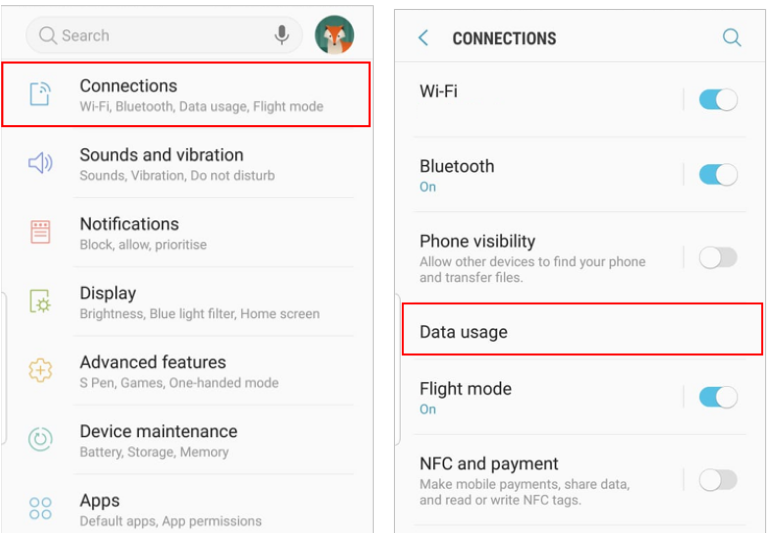
Spyware sends your private information to remote servers using your data.
Check this:
- Go to Settings → Data Usage
- Look for apps using large amounts of data that you don’t recognize
Unusual background data usage is a strong indicator of spying activity.
4: Strange Pop-Ups and Redirects
If you notice:
- Random ads appearing
- Browser opening by itself
- Redirects to strange websites
It may not just be annoying ads — it could be spyware or adware tracking your activity.
5: Unknown Apps Installed on Your Phone
Spyware often hides under fake app names like:
- System Service
- Device Update
- Security Tool
What to do:
- Go to Settings → Apps
- Look for apps you don’t remember installing
If you see suspicious apps, that is a major red flag.
6: Messages and Calls Acting Strange
Some spyware can:
- Record calls
- Read messages
- Send messages without permission
Warning signs include:
- Messages marked as read when you didn’t open them
- Unknown messages sent from your phone
- Call logs you don’t recognize
This is serious and requires immediate action.
7: Phone Performance Suddenly Drops
Spyware slows down your phone because it steals system resources.
You may notice:
- Apps opening slowly
- Phone freezing often
- Random crashes
If your phone performance suddenly worsens, spyware may be working in the background.
How to Remove Spyware from Your Phone
Now that you know the signs, let’s talk about how to remove spyware safely.
Step 1: Scan Your Phone with Trusted Antivirus
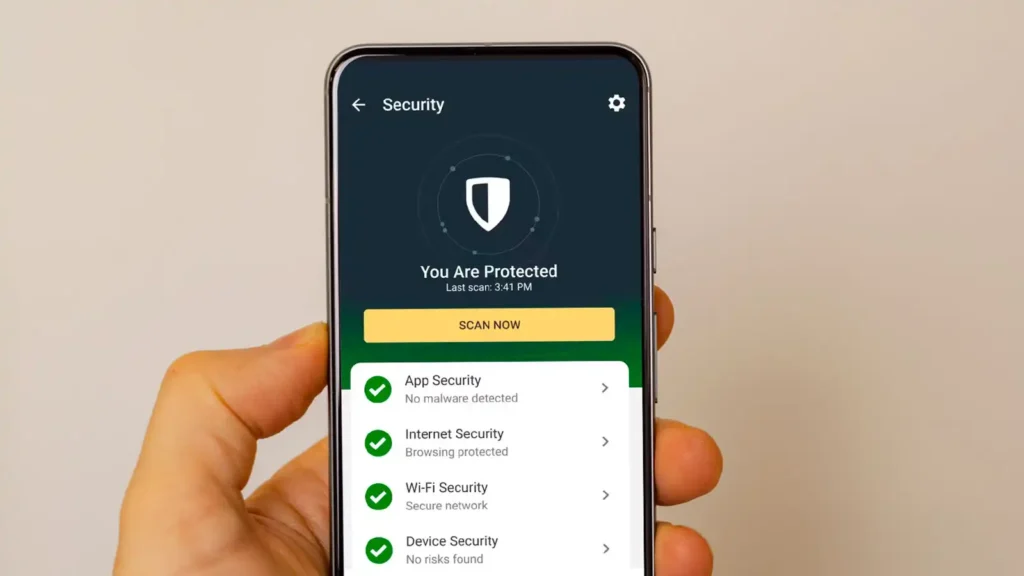
The easiest way to detect spyware is using a trusted mobile security app.
Download only from Play Store:
- Bitdefender Mobile Security
- Avast Mobile Security
- Malwarebytes for Android
Run a full scan and follow the removal instructions.
Do not download antivirus apps from websites — many are fake.
Step 2: Uninstall Suspicious Apps Manually
If you notice unknown apps:
- Go to Settings → Apps
- Select the suspicious app
- Tap Uninstall
If uninstall is blocked:
- Go to Settings → Security → Device Admin Apps
- Disable admin access for the app
- Then uninstall it
Step 3: Remove Dangerous Permissions
Some apps misuse permissions to spy on you.
Check permissions:
- Go to Settings → Privacy → Permission Manager
Review:
- Microphone access
- Camera access
- Location access
Remove permission from apps that do not need them.
Step 4: Update Your Phone Software
System updates often fix security vulnerabilities.
- Go to Settings → Software Update
- Install all available updates
Never ignore updates — they are critical for security.
Step 5: Factory Reset (Strongest Solution)
If spyware remains or phone behavior is still strange, factory reset is the best option.
This will erase everything on your phone.
Before reset:
- Backup important files
- Do NOT restore unknown apps afterward
Then:
- Go to Settings → System → Reset
- Tap Factory Data Reset
After reset, install only trusted apps.
How to Prevent Spyware in the Future
Prevention is easier than removal.
Follow these rules:
- Install apps only from Play Store
- Avoid cracked or mod apps
- Don’t click suspicious links
- Review app permissions regularly
- Keep phone updated
- Use mobile security apps
Your habits are your strongest protection.
When Should You Get Professional Help?
If:
- Phone still behaves strangely after reset
- Sensitive accounts are compromised
- Banking apps were accessed
Then contact:
- Your bank
- Network provider
- Phone repair service
Serious spyware infections can cause financial loss.
Final Thoughts
Spyware is silent, dangerous, and increasing fast in 2026. But once you know the warning signs, you can stop it before serious damage happens.
If you notice unusual battery drain, overheating, strange data usage, or unknown apps, do not ignore it. Take action immediately.
By following the steps in this guide, you can remove spyware and protect your personal information from hackers.
For more online safety tips and phone protection guides, keep visiting TechFixera.